Opening page
Choose a title, destination, travel dates and a striking photograph. Add a short introduction explaining why you made the trip.
Bring your holiday memories to life with photographs, daily stories and beautifully composed pages.
Follow WrightType's developmentKeep a few notes each day: where you went, what surprised you, a memorable meal, a conversation or a funny mishap. Record dates and place names while they are fresh. Select photographs that tell the story rather than trying to include every picture.
Choose a title, destination, travel dates and a striking photograph. Add a short introduction explaining why you made the trip.
Use a consistent date and location heading, a few paragraphs of memories and one or two captioned pictures.
Give a memorable excursion, landmark or local recipe its own page. Vary the picture size to establish a clear focal point.
Record favourite places, things you learned and ideas for a future visit. Add an index of places if the journal is long.
Choose a readable body font and a consistent heading style. Start with one prominent picture per page, then add smaller supporting photographs if space permits. Use proportional resizing, short captions and comfortable space between text and pictures. Text wrapping can help a story flow beside a photograph; a full-width image can create a deliberate break between stories.
Our Toronto After Dark editor demonstration shows how an illustrated travel document can be edited with interactive picture positioning and text wrapping. WrightType is being developed to combine traditional paginated word processing with a creative workspace around the page.
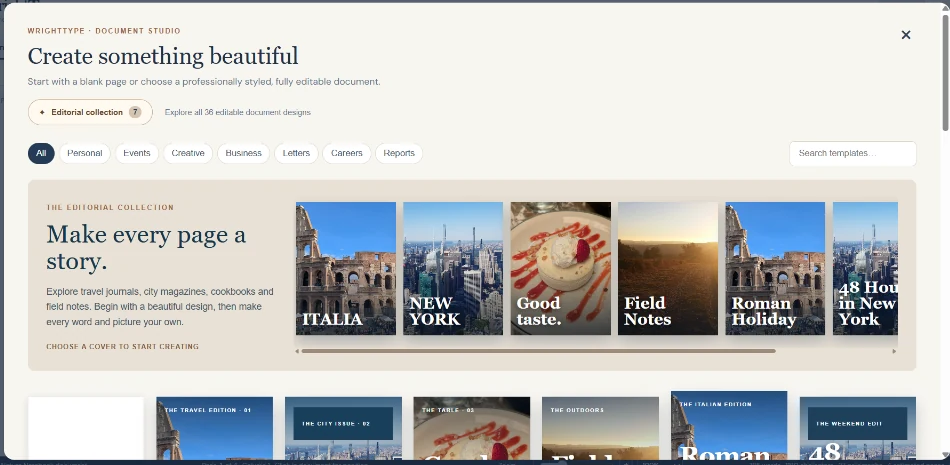
WrightType development screenshot, not a downloadable travel journal template.
A5 is a convenient size for a compact printed journal, while A4 gives larger photographs more room. A paginated word processor suits a diary with substantial flowing text; a specialist photo book service may suit a mainly photographic album. Test a printed page before committing to the whole book.
Keep original photographs separately, back up the editable document and retain a PDF copy for sharing. If you plan to work while travelling, check offline editing and saving before departure. Avoid publishing private booking references, addresses or photographs of other people without appropriate permission.
Create a family magazine · Wrap text around pictures · Work offline · Template inspiration
WrightType is in active development. Purchases are not yet available; features and platform availability are subject to final release testing. This guide is not a downloadable travel diary template.
Discover how WrightType approaches interactive picture positioning and Creative Desktop. See the full feature showcase or watch the editor demonstration for a closer look at the developing software.