Write directly on the page
See the relationship between text, margins and pictures as you work in a paginated editing environment.
What if writing and designing a document felt like working at your own creative studio? WrightType brings together the ideas of traditional word processing, visual page composition and a personal workspace.
Follow our developmentWhat if your word processor felt more like a creative studio? WrightType is exploring a fresh approach to bringing words, pictures and page layout together in an inviting, visually rich workspace.
Directly editable pages, picture positioning and text wrapping are part of the developing editor. Our Creative Desktop vision goes further, exploring how images and design materials might live around the page as well as on it.
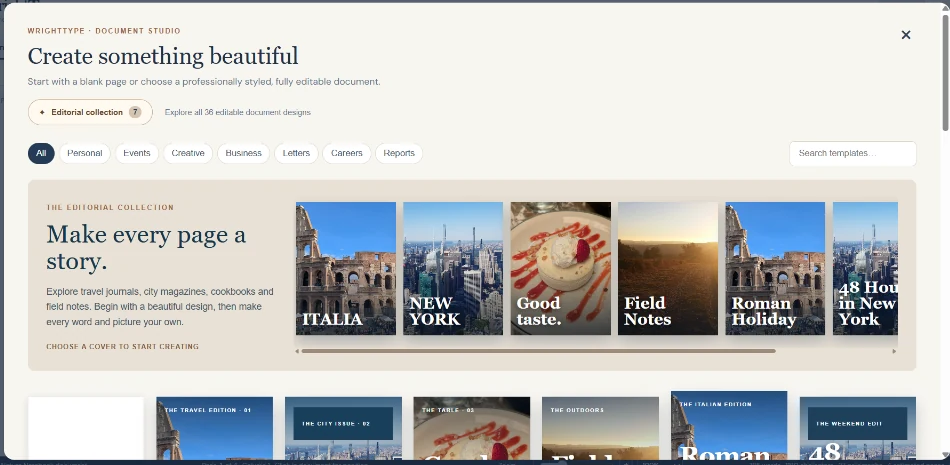
Early development screenshot — click to enlarge. Interface and features are subject to change.
Register your interest ahead of betaA traditional word processor treats the page as the destination for your words and pictures. The Creative Desktop vision treats the surrounding workspace as part of the creative process too: a place to arrange ideas and visual material as you compose.
See the relationship between text, margins and pictures as you work in a paginated editing environment.
Explore picture placement, sizing and text wrapping rather than treating photographs as an afterthought.
Our developing desktop themes explore the feel of real paper, rulers and different desk surfaces.
Choose typefaces, paragraph spacing and alignment to give each document its own character.
Imagine preparing an illustrated travel diary. Begin by writing your account, then introduce photographs where they add to the story. A picture might sit beside a paragraph, span the width of the text, or become the focus of a page. As you adjust the composition, the surrounding words need to respond.
That relationship between writing and design is central to WrightType. The aim is to let you develop the content and its appearance together, rather than treating layout as a separate task at the end.
Combine a flowing narrative with photographs and captions, using page layout to establish a sense of place.
Give stories their own visual identity through headings, photographs and carefully chosen spacing.
Our first full demonstration shows direct editing on pages, picture positioning, text wrapping and the wooden workspace in a working development build.
Explore our practical guides to wrapping text around pictures, professional document design and choosing typefaces.
Word processors are especially useful when text needs to flow across pages. Dedicated publishing tools are often better suited to complex fixed layouts, professional prepress and detailed production requirements. WrightType is exploring the space between everyday writing and creative page design, rather than claiming to replace every specialist publishing tool.
Try a family newsletter, illustrated travel diary, invitation, school worksheet or promotional flyer. Start with a clear hierarchy of headings and body text, choose a small palette of colours and typefaces, and leave enough white space for the content to breathe.
Explore WrightType for writers and authors, small businesses and our planned Creative and Professional editions.
WrightType is in active development. Screenshots show development builds; features and availability are subject to final release testing.
Register your interest