Page setup and margins
Choose paper dimensions, orientation and margins to suit the intended printed document.
Bring the freedom of creative page composition together with the convenience of flowing text.
Register your interestWhen creating a newsletter, illustrated report or book, the relationship between words, pictures and white space matters. WrightType is being developed around direct paginated editing, so the page itself becomes the working surface rather than merely an output preview.
Choose paper dimensions, orientation and margins to suit the intended printed document.
Use familiar units such as points, centimetres and inches, with ruler controls for paragraph indents and tab stops.
Position and resize photographs, choose wrapping behaviour and decide whether a picture moves with text or is fixed to a page.
Control paragraph alignment, indentation and spacing to establish a consistent visual rhythm.
ILLUSTRATED REPORT
The text flows beside the picture, making use of the available space. Margins define the main text area, while headings and paragraph spacing give the page structure.
A consistent layout helps readers concentrate on the content.
1
Illustrative page anatomy with margin guides and picture wrapping, not an editor screenshot.
Traditional word processing is particularly useful for text that flows across pages. Desktop publishing often focuses on independent frames and complex fixed layouts. WrightType explores the space between these approaches, including a Creative Desktop around the document. Specialist publishing software may still be appropriate for advanced prepress, colour management and complex imposition.
Set the intended page size before arranging content. Use paragraph formatting rather than repeated blank lines, check image placement after revisions and print a representative page at actual size. Zoom should change the viewing scale rather than the intended paper dimensions. Test imported DOCX documents because fonts and layout differences can affect pagination.
Explore our practical guides to newsletters, menus, flyers and illustrated family histories. Learn more about advanced typography and word processing versus desktop publishing.
WrightType is in active development. Purchases are not yet available; features and platform availability are subject to final release testing.
Explore the editor and its approach to direct page composition.
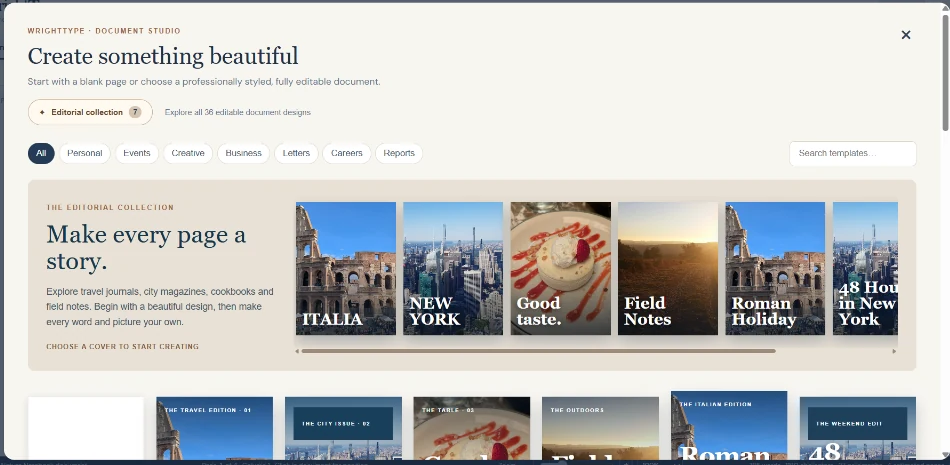
Actual WrightType development screenshot.
Follow our progressExplore the full WrightType feature showcase, see the editor in action on our demonstration page, or compare the planned editions and pricing.
Follow development and receive launch news. Registration is not a purchase.